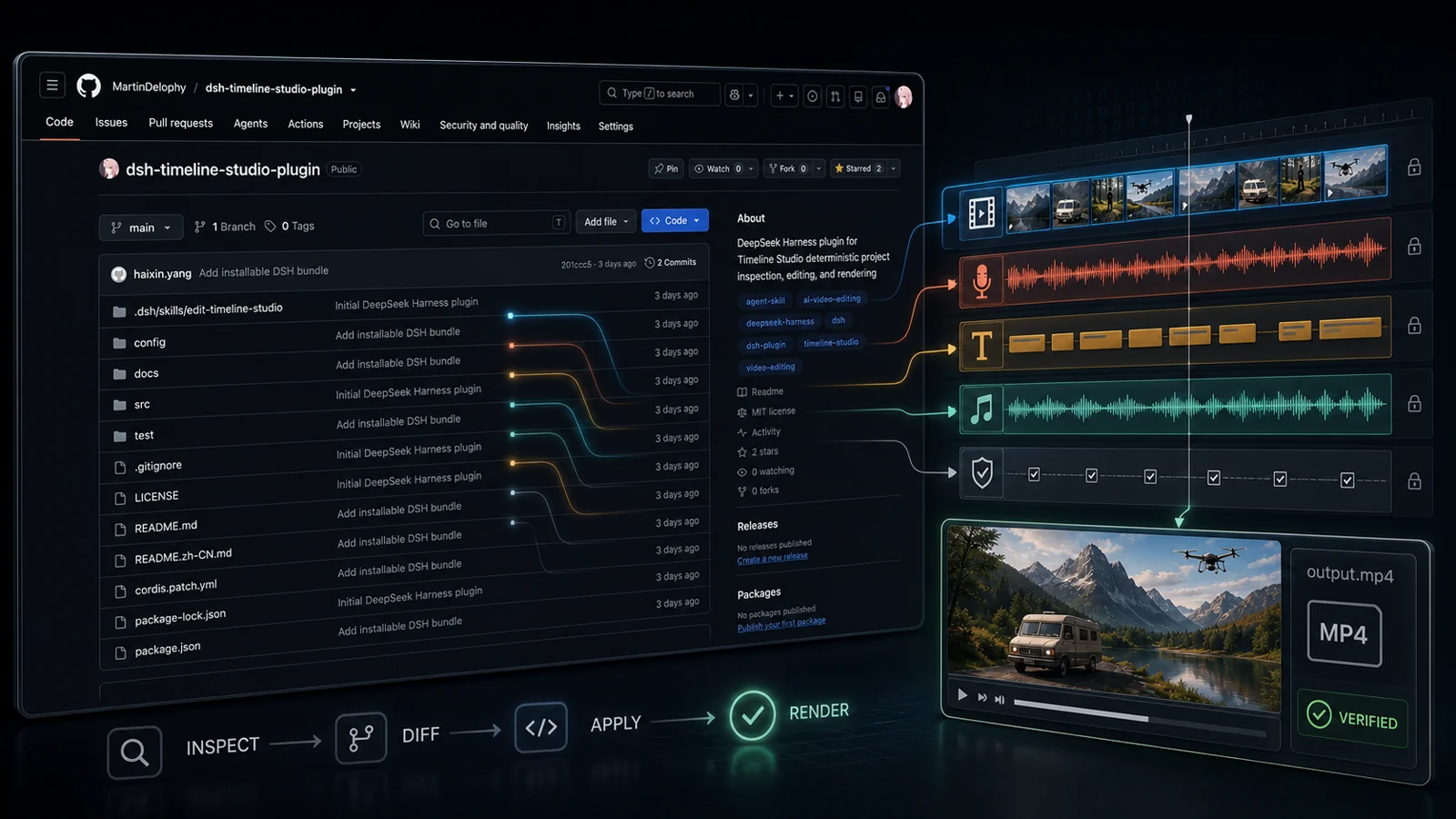
This is an action bridge, not another editor
The tempting way to integrate an Agent with a video editor is to build a second editing surface around the model: another panel, another representation of tracks, another set of partial rules. That is also how three versions of the same product logic begin to drift apart. The plugin takes a thinner position. DeepSeek Harness owns discovery, validation, cancellation and model-facing results. The plugin launches Timeline Studio's command runner. Timeline Studio owns project parsing, edit validation, transactional writes and rendering.
The plugin is mounted inside Harness and does not add a separate visual panel. It also bundles the edit-timeline-studio Agent Skill, so the model receives both the tools and the operating guidance required to use them responsibly. The browser editor remains the place for visual preview, WebGPU features and composition that still needs direct human judgment.
Seven tools are enough when their boundaries are honest
The seven tool definitions at commit 201ccc5 keep the model-facing API small. Four read tools inspect a project, track, clip or transcript. One previews a semantic project diff. One applies a batch. One renders. That separation gives the Agent a predictable rhythm: understand before proposing, preview before writing and verify after changing.
A dry run matters only if it exercises the same reducers and revision rules as the real write. The adapter forwards diff and apply to project.diff and project.run; it does not implement a second reducer. The separate September 7 CLI case compares an actual preview with a saved write. That case does not run the Harness adapter. Also, “diff before apply” is guidance in the tool description: this adapter does not retain a token proving a previous diff succeeded.
The transaction begins with revision and identity
Editing is retry-heavy. An Agent call may time out after the command has already written a result. A user may change the project between inspection and apply. Without explicit identity, a retry can move the same clip twice; without a base revision, an apparently valid plan can overwrite a newer edit. The plugin uses both.
A successful non-empty operation batch increments the project revision once. Reusing an already-applied operation ID is an idempotent no-op. A stale base revision carrying new operations fails. If validation or any operation fails, the batch does not leave a half-edited archive behind. Source projects are not overwritten by default; a new editable project becomes the result.
The separate CLI handoff record verifies revision one, a repeated operation ID producing no new edit, and a stale new operation returning REVISION_CONFLICT. It uses Timeline Studio commit 68980d1 directly, so it is supporting evidence for the command layer, not a rerun of the historical Harness test. For this plugin review, inspect the fixed 201ccc5 snapshot rather than a moving branch.
The filesystem boundary is part of the product
A path argument is not permission. The plugin's allowedRoots setting is a real filesystem boundary for project, plan, output and asset paths. The runner resolves real paths and checks project, imported-asset and output paths. Existing output symlinks are rejected and new output parents are canonicalized. These are the path cases exercised below; this is not a complete security audit of arbitrary archive contents or filesystem races.
Cancellation is visible in the child-process call: the runner passes the supplied AbortSignal to Node execFile and converts an abort into a canceled error. This review does not test cancellation or prove that every descendant FFmpeg process terminates. A separate executed case below verifies conversion of a deliberate ok:false child response into an error.

Six runner checks have a replayable record
On September 8, 2026, we ran six unchanged tests from the pinned upstream command-runner suite. They call the real runner against the test file's synthetic child CLI. That child echoes arguments or deliberately returns INVALID_PROJECT; it does not load Timeline Studio's command engine.
The passing cases cover command/path forwarding, an out-of-root project, an out-of-root output, an out-of-root imported asset, an output symlink, and a structured child error. The run report records Node 22.14.0 on macOS arm64, exit status zero and six passed tests. The unaltered TAP log lists each result. The full plugin declares Node 22.20+ or 24+; this isolated runner check does not establish full-plugin compatibility on the older runtime.
Download the complete reproduction kit, check its checksums, then run node reproduce.mjs ./my-run. The method and limitations explain the exact name filter and synthetic child boundary. The source manifest pins every included file. No account, package installation, model, API key or network call is needed. The registration test that imports dsh-tools is omitted; Cordis, media import, cancellation and rendering are not exercised.
The old MP4 result remains a historical report
The upstream testing document reports seven unit tests and one Harness/Cordis E2E pass on August 15, 2026, using Node 24.11.1, Harness rc.6, Cordis 4.0.1 and FFmpeg 8.0.1. It also explicitly says that generated media lived in the OS temporary directory and were not retained in the repository. No original run log or MP4 was available in the checked snapshot. Those counts are therefore attributed historical claims, not independently verified results from this review.
The actual E2E definition creates a one-second synthetic blue visual, imports it, changes the ratio, inspects the result and requests a 180×320 render. Its media assertions expect hasAudio: false, a nonempty MP4, positive duration and matching dimensions. They do not fully decode the MP4 or test an audio stream. Finding these assertions establishes what the test is written to check, not whether that historical run passed.
A different, retained example is the September 7 archive-and-render case. Its record covers a six-second 180×320 slate-and-tone MP4, byte-preserved archive entries and full FFmpeg decoding. It executes the Timeline Studio CLI directly, without Harness or Cordis. It must not be presented as the missing artifact from the August plugin test.
The durable outcome is an editable project
The most important design choice is not technical. The plugin does not reduce video editing to “prompt in, MP4 out.” The rendered video is a deliverable; the versioned .timeline archive remains the record a person can reopen, review and change. That is why inspection, diff and apply are first-class tools instead of hidden implementation steps.
The intended workflow is concrete: inspect current state, preview a plan, write a new editable project and verify the output media. This review establishes a bounded part of that workflow and publishes enough source and execution detail to repeat it. A current full Harness integration still needs its own retained run and media artifacts.