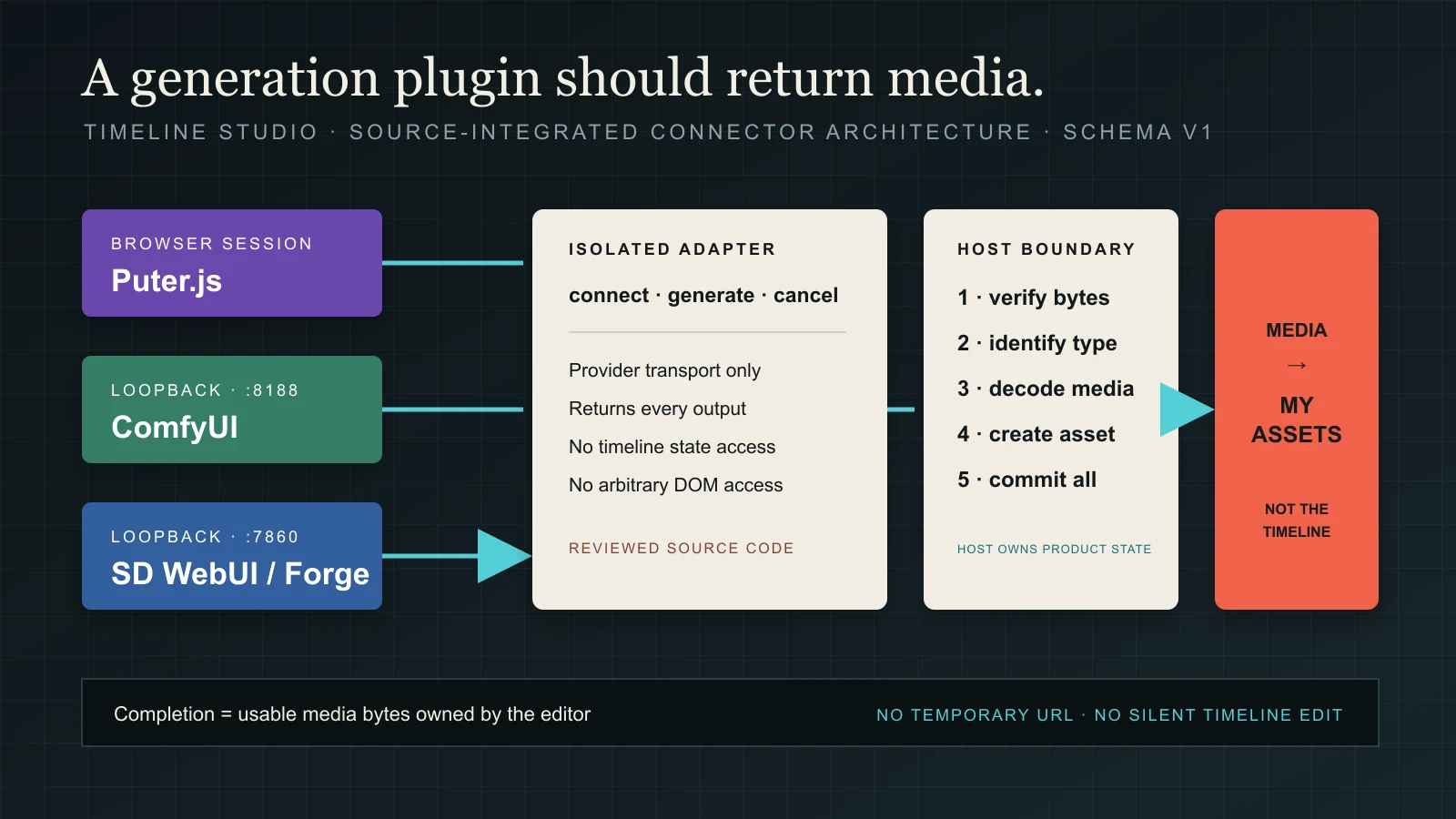
A generation plugin should return media, not control the timeline.
Timeline Studio now connects Puter.js, ComfyUI and Stable Diffusion WebUI or Forge through one generation-provider contract. The interesting part is not the catalog. It is the boundary that prevents provider code from becoming a second, less accountable editor.
Published September 3, 2026 By Martin Delophy Engineering field note · Source-reviewed
The implemented path is provider → isolated adapter → host validation → My assets. No provider receives timeline mutation functions, and a completed output is not placed on a track automatically.
THE SHORT VERSION
The plugin contract is useful because it defines what provider code cannot do. Generation remains replaceable; the host keeps ownership of media truth and editor state.
01
“Plugin” currently means a reviewed connector
The name can easily imply a marketplace where arbitrary packages are downloaded and executed at runtime. That is not what has shipped. The current implementation keeps manifests and adapters in the Timeline Studio source tree, registers them during the build and reviews them with the rest of the application. There is no third-party code loader, runtime permission prompt or compatibility negotiation yet.
That limitation is a security feature until those missing pieces exist. A generation connector can touch remote accounts, local AI servers and media bytes. Calling any JavaScript bundle a plugin before defining its permissions would turn an extension label into ambient authority. The development contract is explicit: today, adding a plugin means contributing a reviewed provider adapter to the repository.
ComfyUIloopback at 127.0.0.1:8188 workflow-image · workflow-video
SD WebUI / Forgeloopback at 127.0.0.1:7860 text-to-image · image-to-image
02
A manifest declares capability; an adapter performs transport
Each provider has two deliberately different responsibilities. Its manifest describes stable identity, runtime class, authentication mode, capabilities, output types and default endpoint. Its adapter connects to the actual SDK or HTTP API, converts the shared request into provider-specific calls and returns normalized outputs. React state is not part of that transport layer.
The shared registry contains exactly three manifests. The hook looks up the corresponding adapter, coordinates connection and generation attempts with AbortController, and passes the result to the host. Adding a fourth provider therefore does not require another provider-specific network branch inside the shared hook.
The separation matters during failure. A malformed provider response should fail in its adapter or at the host boundary. It should not leave half-created React state, a guessed timeline object or a success message backed only by a URL.
03
Three providers, three real connection models
Puter.js owns a browser session and popup authorization flow. Connection waits for the provider's actual sign-in result instead of optimistically changing a badge. Image generation calls puter.ai.txt2img; video generation calls puter.ai.txt2vid. The adapter then resolves or downloads the returned media. The Grok image path uses a temporary provider file and removes it after the bytes have been read.
ComfyUI and Stable Diffusion WebUI are local services, but “local” is verified rather than assumed. Their endpoint parser accepts only localhost, 127.0.0.1 or ::1 over HTTP or HTTPS. ComfyUI checks /system_stats; WebUI checks /sdapi/v1/samplers. A network failure is translated into a message that tells the user to check whether the service is running and whether CORS permits the editor origin.
Once connected, ComfyUI submits a workflow to /prompt, polls /history/{prompt_id} and downloads every reported output through /view. WebUI calls either /sdapi/v1/txt2img or /sdapi/v1/img2img and decodes every returned base64 image. The adapter does not silently keep the first file when a provider returns a batch.
04
A temporary URL is not a completed asset
Generation APIs often return URLs that are signed, session-bound or short-lived. If an editor stores that URL as its result, the thumbnail may work during the session and disappear after a refresh—or expire before export. The development contract requires downloaded, usable media. At this reviewed snapshot, the host enforces nonempty bytes and image decoding, while the video path has the metadata gaps reproduced below.
Download every outputVerify non-empty BlobDecode image / inspect video metadataCreate My assets entries
For images, the host reads the file signature, reconciles the declared MIME type, creates an ImageBitmap and rejects a file with no dimensions. PNG, JPEG, WebP and AVIF signatures are recognized. For video, the host inspects metadata only when the output omits width or height. Metadata error or timeout resolves with fallback dimensions and duration rather than rejection. Object URLs used only for inspection are revoked.
The host builds asset entries and browser-local URLs while processing the batch, then prepends the batch to My assets after the loop completes. This is stronger than retaining a temporary URL alone, but the video fallback means “complete” does not establish successful decoding. A later invalid output prevents the library update; an earlier prepared URL remains registered until separate cleanup.
05
Generation is not permission to edit
The host commits results to My assets and selects the latest imported item. It does not create a clip, choose a track, move the playhead or infer how long a generated image should remain visible. Those are editorial decisions, even when the prompt was entered from inside an editor.
This boundary also makes batch results legible. If ComfyUI emits several images or videos, the complete batch becomes library assets only after every output is processed successfully. A user can compare them, reject them, rename them and deliberately insert the chosen media. Automatic placement would collapse generation and editing into one irreversible-looking action and make failure recovery harder.
Provider adapter may
Provider adapter may not
Host remains responsible for
Connect to its declared runtime
Read or mutate timeline state
Arbitrating the active job
Translate shared requests
Call setUserAssets directly
Validating all returned media
Report provider-backed state
Fabricate progress or success
Creating asset IDs and object URLs
Return normalized outputs
Insert clips automatically
Committing the batch after all outputs are processed
06
Cancellation needs an honest verb
The shared hook creates an AbortController for each connection or generation attempt and checks whether callbacks belong to the active attempt. One job owns the shared inspector surface. Its cancel handler awaits an optional adapter cancel request before aborting the client controller and setting a cancelled state. These lifecycle paths are source-reviewed here; the offline experiment below does not execute the React hook.
ComfyUI has an /interrupt endpoint, and its adapter sends a cancellation request. At this snapshot it ignores HTTP failure status and catches network errors, so a resolved cancel call does not confirm a remote stop. Other adapters may only stop client-side work. The distinction belongs in user-facing language because remote compute may continue after the editor stops listening.
Progress follows the same discipline. A percentage is shown only when a provider supplies meaningful progress; otherwise the running state remains indeterminate. A polished progress animation is not evidence that an external system knows how much work remains.
07
What this architecture proves—and what it does not
The code establishes a source-integrated provider architecture: validated manifests, separate adapters, loopback restrictions, host-owned image validation and video metadata handling, lifecycle coordination and a My assets destination. The executable cases below identify where the implementation falls short of its intended media guarantees. It provides a repeatable place to add another generation provider without moving transport logic back into a monolithic hook.
It does not prove that every model is available in every region, that Puter account terms or model prices will remain unchanged, that a user's local ComfyUI workflow is safe, or that generated media is accurate or publishable. Provider availability, cost, browser support and content restrictions remain provider-specific. Local endpoints also remain software running on the user's machine and should not be exposed beyond loopback without a separate security design.
Most importantly, this is not yet a general plugin marketplace. Runtime installation would require signed or otherwise attributable packages, permission declarations, version negotiation, sandboxing, revocation and a review model. Until those controls exist, source integration is the honest name for what ships.
EXECUTED SOURCE CASE / SEPTEMBER 7, 2026
The counterexample: a video result can pass without video bytes
The architecture has a useful boundary, but its stated contract is stronger than the implementation at the reviewed commit. I ran fifteen groups of assertions against the original source and found five limitations worth separating from the intended design. In the clearest case, plain text labelled as video was accepted when the output supplied its own dimensions.
EXACT SOURCE
Commit 3684ec4, the September 1 snapshot cited by the original article. Fourteen source, document and license files are included without transformations. The public copy of host.js also matched byte for byte.
WHAT RAN
Node 22.14.0 on macOS arm64, using the production contract, registry, host and local-provider adapters. The fifteen assertion groups passed because they reproduced the recorded behavior, including negative findings. This is not a report that all product guarantees passed.
EXTERNAL BOUNDARIES
Fetch, object URLs, image decoding and video DOM events use disclosed test doubles. The image double accepts only the byte-identical one-pixel fixture. No real provider generation, login, CORS check, browser codec, React hook or timeline UI ran.
01
Start with a result whose bytes contradict its label
The input is the text “This is plain UTF-8 text, not video media.” inside a nonempty Blob with MIME type video/mp4, plus type video, width 640 and height 360. The host's dimensions branch trusts those dimensions and skips inspectVideoBlob. The recorded output is one generated-video asset, 640×360, duration zero. No video element was requested, so this counterexample does not depend on the mock decoder's opinion.
A second case removes the supplied dimensions and sends a controlled metadata error event. The metadata helper resolves on either loadedmetadata, error or timeout. The inspection function then substitutes 1280×720 and zero duration. The experiment executed the error path; the timeout path was source-reviewed. Neither result establishes successful decoding.
That changes the article's strongest claim: this snapshot downloads nonempty video bytes and collects or accepts metadata, but it does not guarantee that every completed video is decodable. A future fix needs rejection on metadata failure and validation even when a provider supplies dimensions.
02
Images have a stronger boundary, with a batch cleanup caveat
For the positive image case, PNG signature bytes override an application/octet-stream label, and the host uses the controlled decoder's 1×1 dimensions. Empty bytes, HTML MIME and an explicit decoder rejection all fail. An empty result list and a temporary URL without a Blob also fail before the asset setter is called. These checks establish control flow around the decoder, not which formats a particular browser can decode.
Two valid image outputs make one library update, ordered second.png before first.png, and select second.png. With a valid image followed by empty bytes, the host rejects the whole batch before that update. However, it has already created and registered one object URL for the first item and does not revoke it within the failing function. Later application cleanup is outside this run.
The unsupported-type case is also instructive: type audio with valid PNG fixture bytes becomes an image. The host has a video branch and an image fallback, rather than an explicit image/video enum rejection. Validate both the declared type and the bytes when tightening this boundary.
03
A cancellation request is not a cancellation receipt
The ComfyUI test records a POST to /interrupt. Its mocked HTTP 500 response still lets cancel() resolve, and a mocked network rejection also resolves. The adapter swallows fetch failures and does not check response.ok. This proves a request was attempted in the harness; it cannot prove a server stopped computing.
A separate WebUI test passes a real AbortController signal into a pending fetch double. Aborting rejects the generation promise with AbortError. That demonstrates propagation of a client abort, while the hook's visible cancellation state and late-result behavior remain source-reviewed. The actual adapters also do not implement the normalizeError method shown in the development document's target interface; local transport errors are handled by the shared helper.
Useful wording for this snapshot is “the editor stopped waiting” and, for ComfyUI, “an interrupt was requested.” An acknowledged remote stop needs its own observed provider result.
04
Reproduce the transport decisions without an account
The offline WebUI response contains two base64 image fixtures, and both become outputs. An empty response fails; img2img without a reference fails before fetch. The ComfyUI response supplies two image descriptors, and both are downloaded through the mocked /view route. Its workflow replaces the exact prompt placeholder with “offline test” and the seed placeholder with the number 42, preserving the numeric type.
The URL parser accepts localhost, 127.0.0.1 and IPv6 loopback over HTTP or HTTPS. The supplied LAN address, public domain, localhost suffix spoof, FTP address and 127.0.0.2 reject. These are parser results; they do not establish redirect handling, DNS behavior or CORS. The recorded request bodies and exact rejection messages are in the report.
Download the kit, extract it and run node verify.mjs. It needs no installation or network. The README identifies every substituted boundary, links the input bytes to each result and lists the acceptance cases that would be needed to close the observed gaps. This makes the source review checkable without presenting a synthetic fixture as a generated artwork.
No. The current providers are source-integrated connectors reviewed and built with Timeline Studio. There is no runtime for downloading and executing arbitrary third-party plugin code.
Does a generated image appear on the timeline automatically?
No. When batch processing succeeds, the outputs are added to My assets. The user decides which result to place on a track and how it should be edited. The video validation limitations are documented in the executable case above.
Can the editor connect to ComfyUI on another computer?
The current loopback boundary accepts only localhost, 127.0.0.1 or ::1. It intentionally does not encourage LAN exposure or wildcard CORS.
Why validate the Blob if the provider says it is an image?
Response labels can be wrong, empty or temporary. This snapshot checks nonempty bytes and image decoding. Its video metadata path can fall back or trust supplied dimensions, so a completed video asset is not yet proof of a successful decode.
AUTHOR
Martin Delophy
Independent full-stack and algorithm engineer in China with 10 years of frontend, AI and audio/video development experience, including 5 years focused on AI. His open-source work includes Timeline Studio, browser AI pipelines, ONNX, WebGPU and agent-compatible creative workflows.