LOCAL RESTORATION · MI-GAN WEBGPU
Removing Watermarks from Images and Video, Frame by Frame
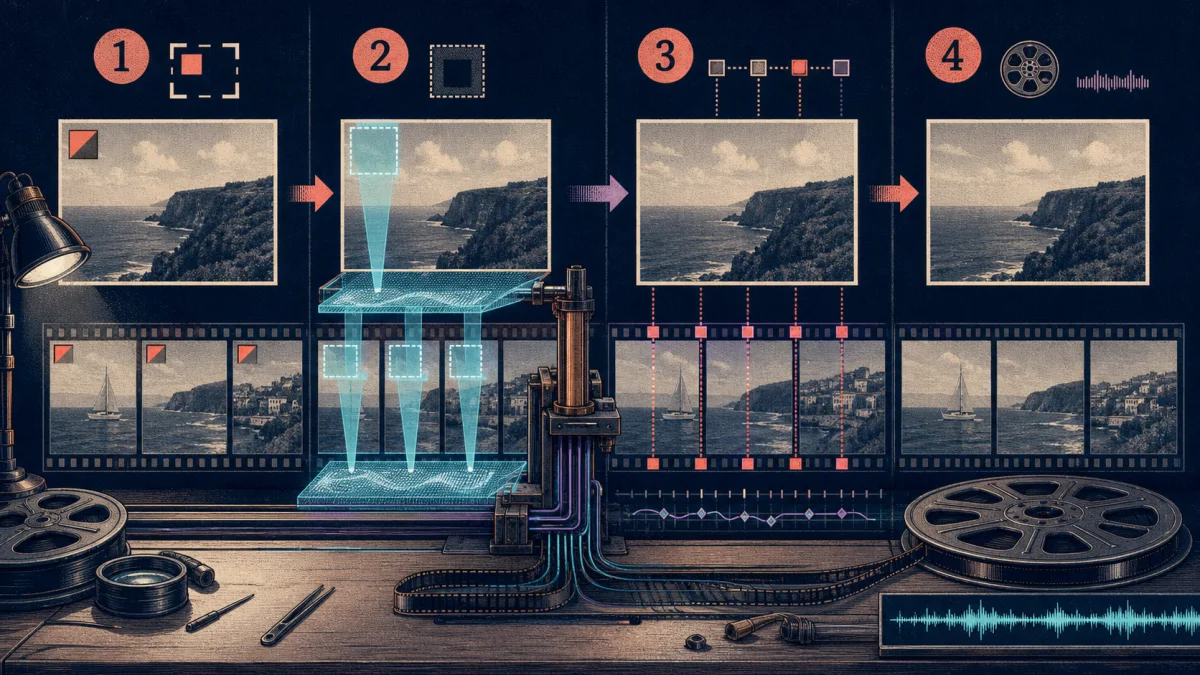
Removing a mark from one photograph and removing it from a moving video look like different products. In Timeline Studio they share one carefully bounded operation: select a region, reconstruct only that region with MI-GAN, feather it back into the original pixels and keep the result editable. Video adds a second clock. Each repair region has a time range, a moving box can be described with position keyframes, every source frame is repaired locally, and FFmpeg.wasm composes the sequence back into an MP4 with the available source audio. This is not a universal eraser. It is a local restoration workflow for media you own or are authorized to modify, with previews, cancellation and explicit limits instead of an unexplained one-click promise.

CHECKLIST
Practical review checklist
- 01Only remove watermarks, logos or objects when you own the media or have explicit permission to alter it.
- 02Keep the mask tight enough to preserve context but include the complete unwanted shape and its edge pixels.
- 03Preview difficult textures such as faces, text, fences, hands and repeating patterns before processing a video.
- 04For moving targets, add position keyframes at direction or speed changes instead of enlarging one box across the frame.
- 05Review the first frame, every range boundary, several frames between keyframes and the final encoded MP4 with sound.
- 06Expect long clips and large masked areas to cost time and memory because the current video path repairs frames sequentially.
The feature is inpainting, not a blur brush
A blur, crop or opaque patch can hide a watermark, but it also advertises that something was covered. Timeline Studio takes a different path. The selected pixels become unknown input to a compact MI-GAN generator, while nearby visible pixels provide context for reconstructing plausible color and texture. The current model is a 256-pixel ONNX generator loaded in a dedicated Worker and executed through ONNX Runtime Web's WebGPU provider. The browser downloads a pinned model revision, stores it in Cache Storage and reuses the session for later frames. No source image or video is sent to a repair service by this code path. Model files still have to arrive from a configured Hugging Face or ModelScope mirror, but inference runs on the user's device.
One normalized box works at every source resolution
The repair dialog stores each selection as x, y, width and height values between zero and one. That makes the same region independent of the preview element's CSS size. At inference time, the selection is converted into integer source pixels and a one-byte mask is filled only inside that rectangle. Normalized geometry also matters for video: a 23-percent-wide box means the same thing while the interface is resized or the frame is sampled at another moment. The UI clamps minimum size and keeps the box inside the picture. Users can draw, move and resize a region, choose a corner preset, maintain several regions and undo or redo region edits without touching the underlying clip.
The model sees a crop, not an unnecessarily shrunken frame
Sending a complete 4K frame into a 256-pixel network would discard most of the evidence around a small corner mark. The Worker first finds the mask bounds, then creates an inference crop centered around them. It adds roughly 192 pixels of context and chooses a crop at least 512 pixels wide and high when the source allows, rounded to a multiple of 256. That crop is sampled down to the model's 256 by 256 input. The first channel tells MI-GAN which pixels are known; the remaining channels carry normalized RGB values multiplied by that known-pixel mask. After inference, the result is sampled back to the crop's source resolution. This does not invent lost detail, but it spends the model's limited input area on the neighborhood that can actually explain the hole.
Only the selected region is composed back
The generator returns a complete crop, yet the application does not replace that whole crop. It extracts only the requested rectangle and leaves all other original pixels intact. Along the rectangle boundary, a smoothstep feather blends reconstructed and original RGB values. Feather width adapts to the smaller side of the selection, with a practical range from six to thirty-six pixels. The blend becomes fully reconstructed away from the edge and increasingly original near a boundary that has surrounding pixels. This reduces the hard seam that a raw rectangular paste would create. The image path also measures changed-pixel ratio and mean channel delta, then reports the composed change rather than assuming any model output is automatically useful.
Images stop after one frame—and remain reversible
For an image, Timeline Studio captures the current bitmap, applies every active region in sequence and produces a PNG preview. A draggable divider lets the editor compare before and after at the same scale. Applying the result creates a new user asset and replaces the selected visual's active source, but the segment's repair metadata preserves the original source, blob, dimensions, source timing and track-frame information. The chosen regions, backend and processed result are recorded alongside it. This is an important product boundary: local AI repair becomes another editable project state rather than destroying the original upload. If the context reconstruction looks wrong, the editor can revise the mask or return to the preserved source.
Video adds time ranges before it adds frames
A watermark may appear only during an intro, disappear behind a cut or move to another corner. Applying one mask for an entire clip wastes inference and can erase legitimate content. Each video region therefore carries its own start and end time. The repair timeline displays those intervals independently, supports dragging either boundary or moving the whole interval, and allows multiple simultaneous regions. During processing, a frame is repaired only when its clip-local timeline time falls inside at least one interval. Frames outside all active ranges are captured unchanged. This temporal gate is both an editorial control and a performance control: it makes the request describe when an object should be absent instead of treating every decoded frame as identical.
Position keyframes track a moving target
A fixed logo needs one rectangle. A moving overlay needs a path. For each timed region, the dialog can record selection keyframes at different clip-local times. The processor sorts those points and, for every frame between two of them, linearly interpolates x, y, width and height. Before the first point it holds the first box; after the last it holds the final box. This is deliberately simpler than optical flow or object tracking. It gives the editor direct, inspectable control and avoids claiming that the system can discover any moving watermark automatically. The practical workflow is to place keyframes at meaningful changes in position, size or direction, preview representative frames, and add another point where interpolation no longer follows the target closely.
Source time, timeline time and playback rate stay separate
Video repair must respect non-destructive edits already applied to a clip. Timeline Studio reads sourceStart, sourceDuration and playbackRate from the selected segment. It seeks the media element to sourceStart plus the local source-frame time, while region ranges and position keyframes live in clip-local timeline time. The conversion is timeline time equals local source time divided by playback rate. This prevents a trimmed clip from accidentally repairing the beginning of its original file, and it keeps a sped-up clip's repair intervals aligned with what the editor sees. The output frame count is derived from the retained source duration and a clamped frame rate; the current UI requests twenty-five frames per second.
Every active frame passes through the same image repair core
The video loop does not contain a second inpainting implementation. It seeks the source video, creates an ImageBitmap for the current frame, resolves all regions active at that moment and calls the same repairMiganFrame function used for still images. When several regions overlap the same frame, the repaired Blob from one pass becomes the bitmap for the next. The UI can display each completed frame while progress advances, and an AbortController can stop decoding, inference and encoding. Reusing one core keeps mask construction, crop logic, MI-GAN preprocessing, feathering and diagnostics consistent across image and video. The media-specific code is responsible for clocks and composition, not for inventing different repair semantics.
FFmpeg.wasm turns PNG frames back into an MP4
The current compositor asks the frame producer for every output PNG, writes the sequence into FFmpeg's in-memory filesystem and encodes H.264 with a veryfast preset, CRF 18, yuv420p and faststart. When the source Blob is available, it writes that media as a second input, trims audio using the selected source start and duration, maps the optional audio stream, encodes AAC at 192 kbps and uses shortest to keep streams bounded. The result is an MP4 Blob. Temporary frame files, audio input and output are deleted afterward; cancellation terminates the FFmpeg instance and clears the cached loader. This is portable browser composition, but it is not free: accumulating PNG frames can consume substantial memory on long or high-resolution clips.
Applying creates a new asset instead of hiding the operation
After video processing, the dialog does not immediately overwrite the timeline. It presents the repaired clip as a comparison preview and enables Apply Video only when a composed result exists. Applying creates a named MP4 user asset, swaps the selected segment to the new Blob URL and stores repair metadata containing the original and processed sources, regions, backend, frame rate and frame count. Source timing resets to the new media because the encoded result already represents the retained source range. The full selected visual duration remains part of the editable project. This two-stage process—process, review, then apply—matters when a reconstruction can look plausible on one frame but shimmer or reveal a seam in motion.
The honest limits are visible in the architecture
MI-GAN reconstructs plausible surroundings; it cannot recover the exact pixels that existed before a watermark was added. Large masks, faces, typography, hands, fences and highly regular patterns can expose incorrect synthesis. The 256-pixel model and nearest sampling limit fine detail, while independent per-frame inference can produce temporal inconsistency because the network has no memory of the previous frame. Position keyframes move the mask, not the generated texture. WebGPU availability, model download, GPU memory, video seeking and FFmpeg.wasm memory all affect whether a device can finish. There is currently no automatic watermark detector or semantic object tracker. These limits make preview and full playback part of the workflow, not optional polish.
Removal capability does not grant removal rights
A watermark often communicates ownership, licensing, attribution or provenance. A tool that can reconstruct pixels does not cancel those obligations. Appropriate uses include cleaning your own exported draft after changing the overlay workflow, removing an accidental timestamp from footage you created, restoring licensed archival material under an agreement, or removing an object from personal media. It should not be used to strip attribution, evade a stock provider's license, disguise another creator's work or misrepresent provenance. Keep the original project and license evidence, disclose material alteration when context requires it, and prefer obtaining an authorized clean source whenever one exists. The technical design is local-first; responsible use still depends on the editor.
REFERENCE
Frequently asked questions
Does Timeline Studio upload my image or video for watermark removal?
The MI-GAN inference and frame composition paths run in the browser. A pinned model file must be downloaded from a configured mirror, but this implementation does not send the source media to a repair API.
Can it process both images and videos?
Yes. Images are repaired as one or more masked frames and saved as PNG assets. Videos reuse the same frame repair core, apply timed regions across decoded frames and compose an MP4.
Can it follow a moving watermark?
The editor can record position and size keyframes for a repair region. The processor linearly interpolates the box between keyframes; it does not currently perform automatic tracking.
Does video repair preserve audio?
When the selected source Blob contains audio, the compositor maps an optional source audio stream, trims it to the repaired source range and encodes it as AAC in the MP4.
Why can repaired video flicker?
MI-GAN evaluates frames independently and has no temporal consistency model. Complex texture can therefore vary slightly from frame to frame even when the mask path is accurate.
Will it recover the exact original pixels?
No. Inpainting synthesizes a plausible replacement from surrounding context. The pixels hidden by the original mark are not available to the model.
Is any watermark legal to remove?
No. Only alter media you own or have permission to modify. Removing attribution or license marks from another creator's work may violate rights or terms even when the software can do it.