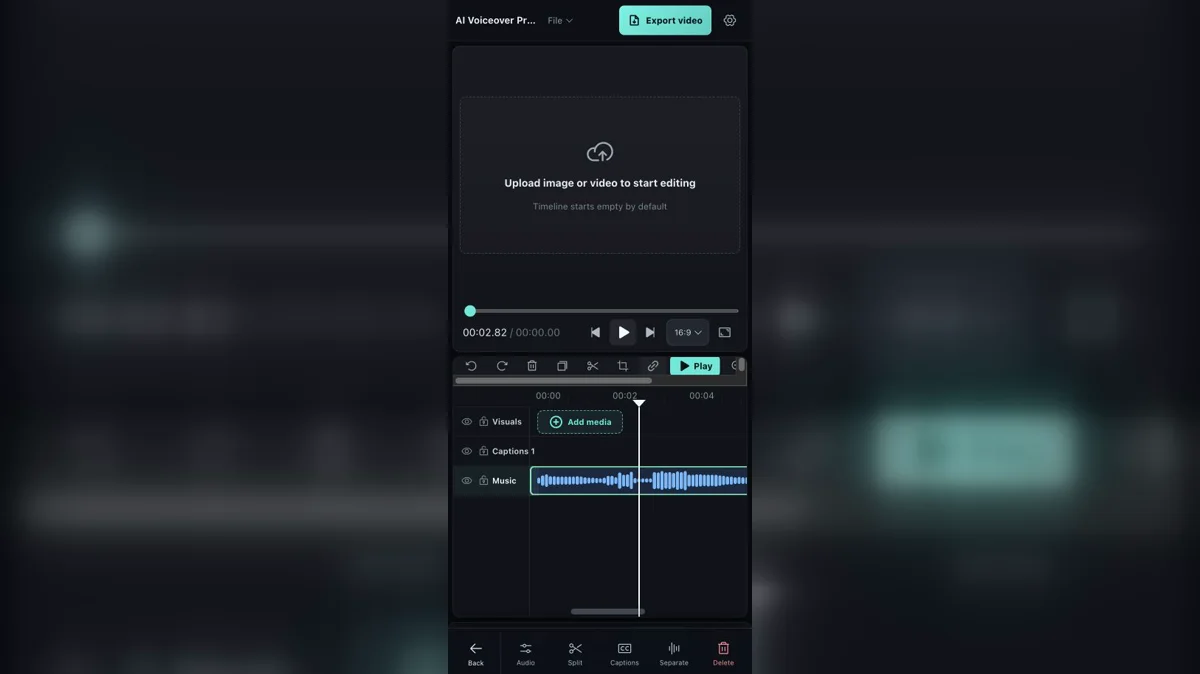
Shrinking a desktop video editor until it fits a phone does not create a mobile editor. The timeline may be visible, yet the important actions remain hidden behind hover states, precise mouse targets and panels that consume the whole screen. Timeline Studio's current development work takes a different approach: keep the multi-track project intact, then redesign selection, navigation and clip operations around fingers, limited width and interrupted attention. The result is not a simplified social-video toy. It is the same editable timeline learning how to behave under two thumbs.
The desktop interaction model was the first thing to remove
A desktop timeline assumes a pointer that can hover, right-click and hit a handle only a few pixels wide. It can keep an inspector, media browser and preview visible beside the tracks because horizontal space is plentiful. None of those assumptions survives a phone. Timeline Studio now treats a mobile clip press as a direct request about that clip, not as a reason to switch the entire application into the clip's tool category. The selected segment remains the subject, while a compact action sheet exposes the next likely decisions. This sounds like a small routing change, but it separates project navigation from object editing—the distinction that keeps a narrow interface understandable.
02
One action sheet cannot pretend every clip is the same
A visual segment can be edited, split, copied or deleted, and an eligible video can expose source-audio extraction. A voiceover or music clip needs audio properties, splitting, caption generation and vocal separation. Linked source audio deliberately omits separation because its relationship to the visual track is different. A sticker needs properties, copy and delete rather than audio commands. The new mobile action resolver encodes those differences instead of filling a generic menu with disabled items. It also resolves the pressed track ahead of stale selection state, so touching music cannot accidentally open properties for the visual clip that happened to be selected earlier.
03
The inspector is a temporary task, not a new home
On a phone, opening properties necessarily covers part of the editor. Timeline Studio records whether the sheet came from an audio clip or sticker clip and gives that temporary session a specific title. Direct clip inspectors suppress the broader Tools and Properties tabs because those tabs imply that the user has changed workspaces. Closing the sheet returns to the timeline without rewriting the persistent tool rail. That detail matters during repeated edits: select a voice segment, adjust speed, close, select music, adjust volume, close. The creator should feel as though they are touching objects in one project, not navigating several miniature applications.
04
Pinch zoom is really a time-coordinate problem
A two-finger gesture changes the rendered width of the timeline, but the important question is which moment stays under the user's attention. The implementation calculates the finger-distance scale in track pixels, clamps it between the full-project fit and the supported maximum zoom, converts the resulting visible duration back into the canonical zoom model and adjusts scroll position so the same time ratio remains beneath the fixed central playhead. Without that anchor correction, a pinch appears to work while the intended cut slides away. Releasing the gesture also has to preserve the exact width reached during the gesture; a final state conversion must not add a small, disorienting nudge.
05
A centered playhead changes how seeking feels
Desktop users often drag the playhead itself or click anywhere on the ruler. On mobile, a fixed central playhead lets the timeline move underneath a stable reference. That reduces the need to cover the target with a finger and gives pinch zoom a natural anchor. It also means ordinary clip dragging and timeline navigation share the same touch surface, so gesture arbitration becomes critical. The current work pauses playback as soon as a clip is pressed. If a second touch turns that press into a pinch, the pending clip drag is cancelled and its tentative position rolls back. A zoom gesture should never leave an audio segment moved by accident.
06
Track locks are protection against narrow-screen mistakes
Visibility and locking solve different problems. Hiding a track changes what the project presents; locking says the material is approved and should remain visible but immovable. The mobile timeline now respects locks before clip moves, transitions and other structural edits, and reports why an attempted operation was refused. This is especially valuable on a phone, where the finger obscures the target and adjacent lanes sit close together. A creator can lock the main visual sequence, continue positioning captions and music, then lock those tracks in turn. The goal is not to prevent editing but to make the allowed scope explicit before a gesture begins.
07
Stickers need lanes, identity and two-edge resizing
Timed stickers are not merely decorations painted on the preview. They are clips with a start, duration, instance identity and preferred subtrack. The new lane packing keeps a sticker in its chosen layer when possible, including after a cross-lane drag, instead of repacking identical assets into an unexpected row. Mobile selection pauses playback immediately, and either edge can be resized while the opposite edge remains fixed. Copying must create a new instance rather than confusing two uses of the same sticker asset. These invariants let overlapping graphics remain editable and keep preview and offline export in the same layer order.
08
Audio speed now carries source time with it
Changing a clip from normal speed to two-times playback is not just a player setting. Its project duration becomes half of the represented source duration, fades must remain within the shorter bounds, captions linked to the clip need a new end time and every seek must multiply clip-local project time by the playback rate before adding sourceStart. Voice, music and linked source-audio pieces now carry those values explicitly. Repeated speed changes preserve the selected source span rather than trimming a little more each time. The same mapping is used when the preview crosses a segment, when the user seeks and when the offline mixer schedules decoded samples.
09
Preserving pitch makes speed useful for speech
A browser media element can request preservesPitch during preview, preventing a faster voice from automatically becoming higher and a slower voice from becoming lower. Export needs its own solution because an OfflineAudioContext buffer source normally changes pitch with playback rate. The current implementation uses a windowed, overlap-add time stretch. It divides source audio into grains, searches around each expected position for a correlated overlap, applies a sine-squared window and combines the grains into the target duration. This is intentionally bounded between 0.25× and 4×. It keeps narration more intelligible than naïve resampling, although extreme changes can still create rhythm or texture artifacts and deserve a real listen.
10
Waveforms and compact labels carry trust
On a desktop, a long label can sit inside an audio clip without obscuring its waveform. On a phone, the same text competes with handles, selection borders and the playhead. The timeline now formats narrow durations compactly and supplies a stable waveform fallback while decoded peaks are not yet ready. Actual peaks are preserved when available. This is not cosmetic work: a waveform tells the editor where speech begins, where silence lives and whether a split appears plausible. If the visual representation jumps or vanishes during a mobile operation, the user loses the evidence needed to make a precise audio decision.
11
The tests describe a gesture contract
The downloadable September 7 case kit below makes the reviewable part of this contract executable. Three mobile check groups run production object-routing, pinch width and anchor calculations, and the minimum zoom boundary from a fixed source snapshot. The shared kit also checks an already trimmed audio split and portable archive integrity. Physical expectations still require their own device run: a pinch must not move a clip, a resize must hold one edge, a locked track must refuse mutation and a speed change must preserve the same source range. The included phone checklist is marked not_run rather than presenting those gestures as verified by a Node test.
12
Mobile editing still has an honest boundary
This work makes the existing multi-track editor operable on a narrow touch screen; it does not make a phone equivalent to a calibrated desktop workstation. Fine color decisions, long-form arrangement and detailed audio cleanup still benefit from a larger display, headphones and precise input. Browser storage and memory limits are also more visible on mobile devices. Timeline Studio's session autosave cannot reconstruct every local File or Blob in a fresh tab, so a portable .timeline archive remains the reliable handoff between devices. A good mobile editor should let someone capture, assemble and repair a real project on the move while preserving the option to continue elsewhere—not pretend device constraints have disappeared.
EXECUTABLE CASE / SEPTEMBER 7, 2026
Put numbers behind the centered playhead
A usable pinch should preserve a particular moment, and an audio press should preserve a particular editing subject. The new downloadable case kit executes those two decisions from a fixed source snapshot and provides a media-filled project for repeating the remaining interaction checks on a phone.
WHAT RAN
Three mobile check groups executed the production action resolver and zoom functions from commit 68980d1 on Node 22.14.0, macOS arm64: object routing, pinch width/anchor preservation, and the minimum zoom boundary. The shared kit passed ten groups including the companion audio split and archive checks.
STALE SELECTION CASE
With a visual clip still selected, an explicit music press resolves to music. An audio-clip inspector origin resolves to the audio context even when the persistent tool is Effects. The mobile press does not activate the tool rail. Linked source audio omits separation, and a sticker exposes its own properties, copy and delete actions.
A MEASURABLE PINCH
Start with a 20-second project, a 400 px viewport and an 800 px track. The 5.0-second moment sits at the 200 px center. Increase finger distance from 100 to 150 px: the function returns a 1200 px track and a 100 px scroll correction. The same moment remains centered because 0.25 × 1200 − 100 = 200.
RELEASE AND MINIMUM BOUNDARIES
Converting the returned canonical zoom back into track width preserves 1200 px within 0.00001 px for this input. Attempting to pinch below the configured minimum keeps the track at 800 px. These are coordinate results, not a measurement of phone frame rate or gesture latency.
01
Use an existing edit to expose accidental movement
Open the supplied six-second project on a phone. It contains two adjacent audio clips, a locked visual slate and the complete synthetic tone source. The right audio clip begins at project 3.5 seconds with sourceStart 2.5. Those unequal values make an unintended move or source reset visible.
Press the right audio clip, confirm the audio actions, open properties and close the inspector. Pinch around the cut, then compare the clip's start and sourceStart with the published metadata. Try a drag followed by a second touch, and separately try moving the locked visual lane. Record the device, browser and orientation alongside each result.
02
Keep the physical-touch result separate from the math
The Node run proves the listed function outputs and archive integrity for explicit inputs. It does not exercise touch-event delivery, pending-drag rollback, browser decoding, mobile memory limits or export quality. The phone checklist is deliberately marked “not_run” so it cannot be mistaken for a passing device test.
The included verify.mjs asserts the production results, checks source fingerprints and recreates the projects with no installation or network access. Numeric editor constants come from the same pinned source; the loader excludes its unrelated React icon imports. The README explains this harness boundary and gives the exact reproduction steps.
REFERENCE
Frequently asked questions
Is the mobile timeline a separate simplified project format?
No. It operates on the same visual, overlay, caption, sticker, voice, source-audio and music tracks as the wider editor.
How does pinch zoom avoid losing the current cut?
The editor changes timeline width and adjusts horizontal scroll so the same timeline-time ratio stays beneath the fixed centered playhead.
What happens if a second finger touches during a clip drag?
The pending drag is cancelled and rolled back so the gesture can become a pinch without moving the clip.
Can audio speed change without changing voice pitch?
Preview requests browser pitch preservation, while offline export uses a windowed overlap-add time-stretch buffer. Extreme rates can still introduce artifacts.
Why lock a track instead of hiding it?
Locking keeps approved material visible and audible while preventing accidental structural edits. Hiding changes presentation rather than edit permission.
Can I start on mobile and finish on desktop?
Yes, but save a portable .timeline archive. A new browser tab or device cannot reliably reconstruct every local media Blob from session autosave alone.
AUTHOR
Martin Delophy
Independent full-stack and algorithm engineer in China with 10 years of frontend, AI and audio/video development experience, including 5 years focused on AI. His open-source work covers browser AI, ONNX, WebGPU, Transformers, Stable Diffusion and local-first creative tools.