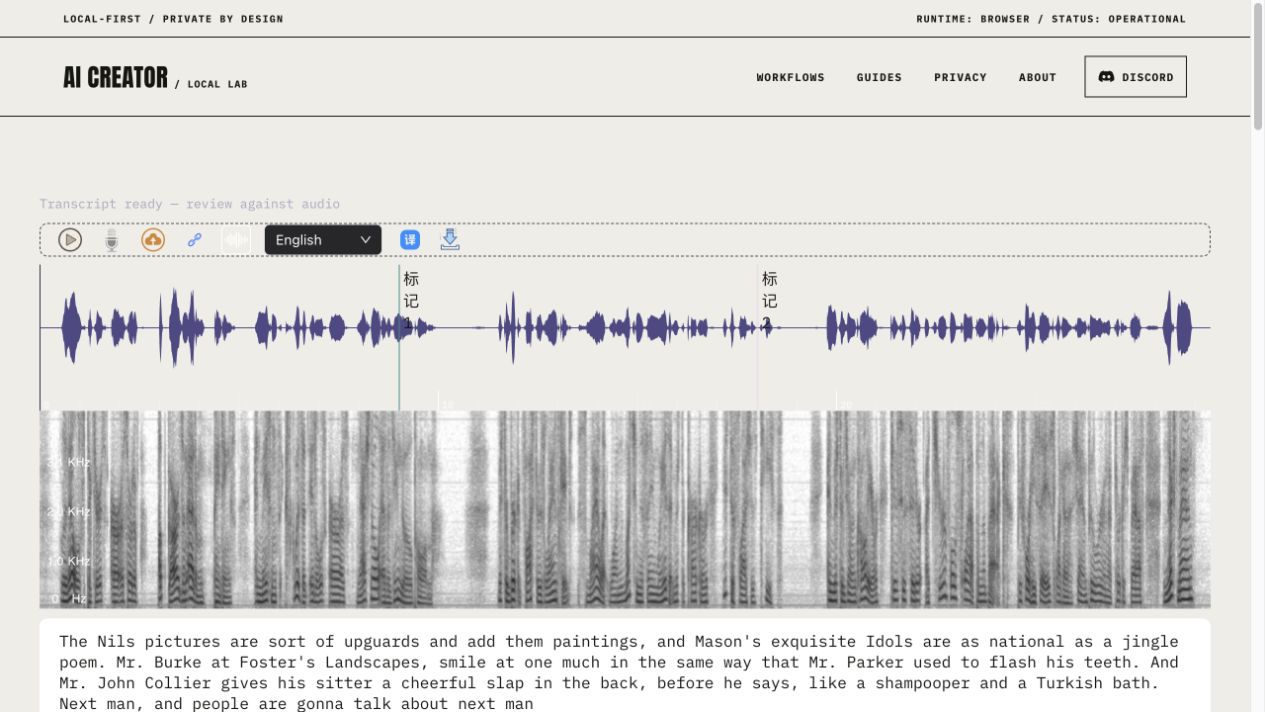
LibriSpeech dev-clean · 1272-128104-0004 · 29.400 seconds · 16 kHz mono. Download the tested WAV or source FLAC.
Untouched model draft
The Nils pictures are sort of upguards and add them paintings, and Mason's exquisite Idols are as national as a jingle poem. Mr. Burke at Foster's Landscapes, smile at one much in the same way that Mr. Parker used to flash his teeth. And Mr. John Collier gives his sitter a cheerful slap in the back, before he says, like a shampooper and a Turkish bath. Next man, and people are gonna talk about next man
Listen to this 29.4-second recording and compare the untouched draft below. Names and phrases need correction, and the draft adds an unsupported ending.
29.4 seconds, one reference, and every correction exposed
The earlier 3.5-second Mandarin sample establishes only that the pipeline returned text. This longer English reading adds a reference transcript, the unedited browser result, an explicit scoring rule and a correction trail. The reference comes from the LibriSpeech corpus; it is not another model's answer and we do not claim a new independent human annotation.
Rechecked on the public website
A separate September 7 check opened the public Whisper page, loaded this exact recording through its audio-URL control, selected English and reached “Transcript ready — review against audio”. The untouched hosted result matches the local draft below, including its unsupported extra ending and 38.24% sample WER. This confirms that one hosted URL-input task completed. Cache was not cleared, and the local-file picker and cold-start speed were not verified. Read the separate public-browser record for those limits.
The language selector uncovered a real defect
The recovered interface displayed language choices but did not send the selected value to its worker. The worker always requested Chinese. The September 7 fix sends the selected language, waits for the complete model pipeline before enabling transcription, and releases the busy state after an error. The recorded English result below was collected after that fix. The separate short Mandarin result remains a historical observation.
Test setup and measurements
Environment
Codex in-app browser on macOS arm64; local static preview served at 127.0.0.1:4173.
Execution
The visible Whisper tool loaded the WAV through its file chooser, English was selected, and the output was captured from the rendered transcript. This is a local browser run of the release preview, not a server-side recognizer.
Model and settings
Local quantized Whisper tiny; English; transcribe; 30-second chunks; 2-second stride. No remote transcription service.
Sample score
26 word edits / 68 reference words = 38.24% WER under the published normalization. This is one sample, not a general accuracy claim.
LINNELL'S PICTURES ARE A SORT OF UP GUARDS AND AT EM PAINTINGS AND MASON'S EXQUISITE IDYLLS ARE AS NATIONAL AS A JINGO POEM MISTER BIRKET FOSTER'S LANDSCAPES SMILE AT ONE MUCH IN THE SAME WAY THAT MISTER CARKER USED TO FLASH HIS TEETH AND MISTER JOHN COLLIER GIVES HIS SITTER A CHEERFUL SLAP ON THE BACK BEFORE HE SAYS LIKE A SHAMPOOER IN A TURKISH BATH NEXT MAN
Download the corpus reference. Its original uppercase spelling and word boundaries are retained for the reproducible score; a publication editor would still need to add punctuation and decide how to present names.
What needs correction in this reading
Browser draft
Reference
Review implication
The Nils
LINNELL'S
A painter’s name becomes two unrelated words. Verify names against the source, not fluent spelling.
are sort of
ARE A SORT OF
Restore the missing article; even small omissions should stay visible in a literal transcript.
upguards and add them
UP GUARDS AND AT EM
An unusual quoted phrase is merged and rewritten. Preserve the reference wording before adding editorial punctuation.
Idols / jingle
IDYLLS / JINGO
Both substitutions produce plausible words but change the art criticism.
Mr. Burke at Foster’s
MISTER BIRKET FOSTER'S
Resolve the full proper name. The scorer separately retains the Mr/mister spelling difference instead of hiding it.
Mr. Parker
MISTER CARKER
Correct the surname. A familiar name can sound more convincing than the right one.
Mr. John Collier
MISTER JOHN COLLIER
The name is retained; Mr/mister is a transcription convention counted by this strict scorer, not a different spoken meaning.
slap in the back / shampooper and
SLAP ON THE BACK / SHAMPOOER IN
Restore the prepositions and the uncommon occupation word.
Next man, and people are gonna talk about next man
NEXT MAN
Delete the unsupported extra ending. The result needs checking against the audio even after the recognizer reports completion.
Download the reference-based corrected reading. This version restores the corpus words and adds editorial case and punctuation. It is clearly separated from both the untouched model draft and the original scoring reference.
Repeat the run and recompute the score
Download the tested WAV above and open Whisper Transcription. Wait until the model is ready, upload the WAV, choose English and start transcription.
Copy the whole returned draft before editing. Replay the audio while checking the proper names and unusual phrases against the supplied reference; keep disputed wording visible.
Download the zero-dependency scorer, the reference and your draft. Run node score-transcript.mjs reference.txt hypothesis.txt. The script lowercases text, removes punctuation, retains word boundaries and computes word-level Levenshtein edits. It does not silently expand “Mr” into “mister”.
The scorer is scoped to this English sample: it keeps ASCII letters, digits and whitespace after normalization. It removes hyphens instead of creating new word boundaries and is not a general multilingual scoring recipe.
This is a single clean English audiobook speaker, with several uncommon names. It does not establish meeting accuracy, speaker separation, noisy-room performance, Mandarin quality, timestamp alignment or processing speed on another device. A low sample error count would not make an unchecked quotation reliable. The useful deliverable is the audio together with a reviewed transcript and an explicit correction trail.
Source: LibriSpeech ASR corpus, Vassil Panayotov, Guoguo Chen, Daniel Povey and Sanjeev Khudanpur, CC BY 4.0. Retrieved through Hugging Face's fixed-revision test subset. Audio was losslessly decoded from FLAC to PCM WAV; the corpus reference is unchanged. Our inference output, correction commentary and scorer are new.
01
Prepare intelligible audio
Use the cleanest recording available. Keep voices at a consistent level and reduce steady background noise when this can be done without distorting speech. Compressed audio can work, but repeated transcoding removes detail. For long recordings, splitting at natural topic boundaries can make review easier and reduce the memory required by a browser-based model.
02
Select language intentionally
Automatic language detection is convenient, but short clips and multilingual speech can confuse it. Choose the known language when the interface supports that option. Names, product terms and abbreviations deserve special attention because common-language models may replace unfamiliar sounds with more probable words.
03
Review against the recording
Read the transcript while replaying the source. Correct names, numbers, dates, negations and statements that carry legal, medical or financial meaning. Mark uncertain passages instead of inventing a confident sentence. If timestamps are available, preserve them during editing so reviewers can return to the relevant audio quickly.
04
Turn speech into readable text
Spoken language contains repetitions, false starts and incomplete sentences. Decide whether the deliverable is verbatim, lightly cleaned or editorially rewritten. Do not silently present a rewritten summary as a verbatim quote. For captions, keep lines short enough to read, synchronize them with speech and include meaningful non-speech audio when accessibility requires it.
05
Consent and confidentiality
Make sure participants know how a recording will be used and that you have the necessary permission to transcribe it. Local-first processing can reduce file upload, but the resulting transcript is itself sensitive and may be easier to search or share than the audio. Store and publish it accordingly.
REFERENCE
Frequently asked questions
Is an AI transcript ready to publish?
Not usually. Important names, numbers and quotations should be checked against the recording.
Why does the first load take time?
The browser needs to download and initialize speech-recognition model files.
Can background music reduce accuracy?
Yes. Music, echoes and overlapping speakers can obscure speech features.
Should I keep timestamps?
Yes, especially during review, because they make uncertain passages easier to verify.
Earlier test record, files and measurements
OBSERVED OUTPUT / SPEECH TRANSCRIPTION
A browser transcript that can be checked against its source
The recovered Whisper workflow was tested with the 3.5-second Chinese recording shipped with the site. The model initialized in the browser, accepted the decoded waveform and returned visible text rather than stopping at a progress indicator.
TEST AUDIO / 3.5 SECONDS
Chinese speech sample used for the browser transcription test
Recovered implementation: local models/whisper-tiny encoder and merged decoder through a quantized browser pipeline.
OBSERVED MEASUREMENT
Observed draft: ‘這是一旦測試英雄經典機工具覽開始操作’. No verified reference transcript, so no accuracy score is claimed.
REVIEW METHOD
Run the bundled audio through the browser workflow and compare every returned phrase with the recording.
SAMPLE LIMIT
One short Mandarin recording; no benchmark for accents, noise, long-form timing or other languages.
REPRODUCE THE CHECK
Open the linked audio, listen once, then load the same file in Whisper Transcription with Chinese selected.
Wait for model initialization, decoding and visible transcript text rather than accepting a completed progress indicator alone.
Replay the recording while correcting names, numbers and uncertain phrases; treat this as one functional sample, not an accuracy benchmark.
01
What the run produced
With Chinese selected, the interface returned the draft ‘這是一旦測試英雄經典機工具覽開始操作’. This is recorded as observed model output, not as a claim that every word matches the source. The attached audio lets a reviewer compare the draft with the actual speech.
02
What the result demonstrates
The test exercises the real page, bundled sample, audio decoding, worker-based Whisper inference and visible transcript area. It shows that this short supported input reaches a completed output state. It does not prove accuracy across languages, accents, microphones or long recordings.
03
What the audio file establishes
The linked test artifact is a 57,722-byte MP3 containing 3.529 seconds of 44.1 kHz mono audio. Its SHA-256 prefix is published in the evidence record so a future test can detect whether the source changed before comparing transcripts.
04
Why there is no accuracy percentage
A word or character error rate requires a human-verified reference transcript and a documented normalization rule for script, punctuation and segmentation. This record publishes neither, so assigning a score would create false precision. The visible draft and playable source remain the evidence.
05
How to review a transcript
Names, numbers and short technical terms can read smoothly while still being wrong. Replay each uncertain interval while following the draft, correct the wording and punctuation, and preserve ambiguity instead of guessing. A person should verify interviews, captions and consequential records against the source before reuse; keep that audio attached for later checks.
AUTHOR
Martin Delophy
Independent full-stack and algorithm engineer in China with 10 years of frontend, AI and audio/video development experience, including 5 years focused on AI. His open-source work covers browser AI, ONNX, WebGPU, Transformers, Stable Diffusion and local-first creative tools.