SOURCE REVIEW AND ENCODER TEST · SEPTEMBER 7, 2026
A playable file is only one part of a talking portrait
For a short narration, the first decision is whether animated lips and facial movement add enough value to justify the wait. We reviewed the browser implementation and ran its encoder on three labelled test cards before commissioning another neural render. The current route has a four-second limit, substantial first-use downloads and sparse generated frames. We would keep it as a portrait experiment and test one second at 256 pixels before considering a longer or larger result.
This assessment did not run new JoyVASA or LivePortrait inference. It does not grade a newly generated performance. Its new evidence is a real one-second WebM made by the pinned encoder, the exact test-card inputs, decoded frame identities and audio-resampling checks. Those validate media boundaries; they do not measure lip synchronization, identity or neural rendering speed. The model-size calculation and earlier development record remain separate evidence.
The experiment: three source cards, eight encoded frames
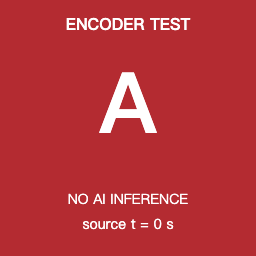
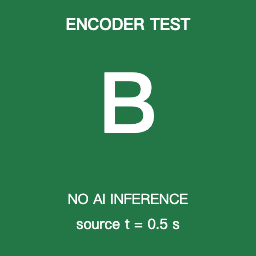
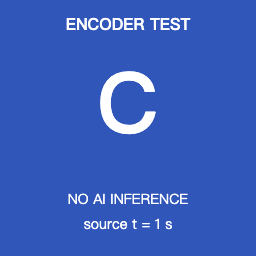
We passed three original 256 × 256 test cards into the actual encodeAvatarFrames function preserved from commit 68980d1, using Mediabunny 1.50.8 in the Codex browser (Chromium 152). Their source timestamps were 0, 0.5 and 1 second. The requested output was one second at eight fps. No portrait, speech-driven motion or neural model was involved. Each card says “NO AI INFERENCE” so this playable result cannot be mistaken for generated-face evidence.
FFmpeg decoded the saved file, and we identified each card from a background pixel away from its label. The resulting sequence was A A A B B B B C. The decoded observations and container probe are preserved, rather than inferred from a progress bar.
| Output timestamps, seconds | Card shown | What this exposes |
|---|---|---|
| 0.000, 0.125, 0.250 | A (source time 0.000) | At the equal-distance tie at 0.250, the earlier input wins. |
| 0.375, 0.500, 0.625, 0.750 | B (source time 0.500) | The card can appear before its own timestamp because selection uses the nearest source image. |
| 0.875 | C (source time 1.000) | The final source image appears in the last output frame; no frame is encoded at exactly 1.000 seconds. |
This matters when diagnosing a mouth that seems early, late or held: changing the container fps does not add new neural poses. The encoder selects available images and holds them. Our cards prove that selection rule for this fixture; they cannot quantify how noticeable it will be on an actual face.
The separate audio check: short speech is padded and long speech is clipped
We also executed the preserved decodeAvatarAudio16k function on two synthetic 440 Hz stereo PCM WAVs at 48 kHz. A 0.25-second input returned 64,000 samples: its first 4,000 samples contain the tone and all remaining 60,000 are zero. A six-second input also returned 64,000 samples, with tone still present at the end. These are observable examples of the fixed four-second, 16 kHz window, not speech-to-motion tests. The browser result includes both observations.
The WebM probe found one video stream and no audio stream, even though this experiment separately supplied audio to the decoder. Decoding speech and encoding pictures are separate operations: the encoder never receives that audio. A successful WebM therefore cannot establish a finished talking performance. The voiceover still needs to be present and audible in the final timeline export.
To reproduce the run, download the complete offline reproduction package and follow its unzip and local-run guide. The ZIP includes the browser harness, exact extracted functions, original inputs and output, FFmpeg verifier, source excerpt and license. Install the specified Mediabunny dependency locally, then run the included loopback server; no model weights are needed. The inputs are downloadable as card A, card B, card C, the quarter-second tone and the six-second tone. Hashes and fixture provenance are in the experiment manifest.
Three different frame rates describe three different things
The JoyVASA configuration requests 25 motion-parameter frames per second and 50 diffusion steps. The renderer uses those parameters to choose sparse portrait keyframes, with a default target of two neural frames per second. The WebM encoder then writes an eight-frame-per-second video by selecting the nearest available keyframe image at each output timestamp. Eight encoded frames therefore do not establish eight distinct neural images or smooth generated motion. The encoding function reuses images; it does not synthesize in-between motion.
| Boundary | What the code does | Why it matters to a reader |
|---|---|---|
| Speech duration | Decode, resample to 16 kHz, retain at most 64,000 samples and zero-pad shorter speech; the generation hook caps video duration at four seconds. | A longer voiceover does not produce a complete longer talking performance through this path. |
| Output size | 256 × 256 preview or 512 × 512 quality generator. | A larger image is a resolution choice, not evidence of better synchronization or identity. |
| Motion playback | Adaptive neural keyframes, then nearest-keyframe reuse for eight-fps encoding. | Held poses and coarse mouth changes must be checked in playback. A contact sheet cannot establish timing. |
| Sound | The intermediate WebM receives a video track only. | Keep the voiceover on the timeline and inspect a final export with audio before calling it a finished talking clip. |
| Automatic rejection | Sampled finite values, variance, magnitude and frame distance; retry once, then reuse a previous valid frame if available. | These guards can catch numerical damage. They do not measure phoneme alignment, eye realism or identity preservation. |
The duration and insertion rules can be followed in the generation hook. The sparse-frame choice and fallback are in the render worker; the narrower numerical checks are in frame-quality evaluation. The neural rendering and frame-guard behavior remain source findings. The encoder and audio-window findings were additionally exercised by the fixture above.
Budget the first download separately from the render
Adding the declared artifact sizes in the pinned JoyVASA and LivePortrait configurations gives the following budget. This is a model-file estimate, not measured transfer traffic, storage consumption or GPU memory use.
| Files needed | Declared bytes | Approximate decimal size |
|---|---|---|
| JoyVASA audio, denoiser and auxiliary data | 412,034,375 | 412 MB |
| LivePortrait preview and shared models | 326,845,205 | 327 MB |
| First complete preview model set | 738,879,580 | 739 MB / 705 MiB |
| Additional 512-pixel generator | 210,713,678 | 211 MB more |
Loading both tiers totals about 950 MB of declared model files. JavaScript, WebAssembly, browser caches and inference working memory are extra. The files are pinned to the published model revision a201b68. Reusing a cache may avoid transfer time; it does not remove neural rendering work. A warm model run and a first visit should therefore be timed separately.
What the historical timing can and cannot tell us
The earlier port note records a playable 3.56-second browser WebM and roughly 25–60 seconds per 512 × 512 neural frame on its tested browser and GPU. That note reports open and closed mouths with head and eye motion. It does not include the original voiceover, downloadable output, complete stage log or a named browser/GPU configuration. We have not re-established those observations in this review and do not present them as a current performance benchmark.
For planning only: the current two-fps keyframe budget permits up to three neural images for one second, or nine for four seconds. If the earlier 512-pixel rate applied, those images alone would take approximately 75–180 seconds or 225–540 seconds respectively. Downloads, session setup, audio-to-motion work, retries and encoding would add time. This arithmetic is an illustration of why a short output may have a long wait; it is neither a prediction for this device nor a measurement of the 256-pixel preview.
A bounded trial that can justify a second run
The next useful trial is a clean one-second speech excerpt and an owned or authorized front-facing portrait, at the 256-pixel preview tier. The audio-to-motion stage still receives a fixed 64,000-sample window and performs its configured work; one second mainly reduces the later portrait-frame count, so it must not be assumed to divide the whole runtime by four. Keep the beginning of the phrase audible, with a lip closure and opening that can be compared against the sound. Save both source files and their hashes. Do not use the older illustrative contact sheet as an input/output record.
- Record the browser version, actual WebGPU adapter, output tier and whether the models are already cached. Keep model download time apart from initialization, motion generation, portrait rendering and encoding.
- Run the one-second preview in an isolated test project. For this editorial trial, use a three-minute warm-run target and stop at five minutes; also stop if a single neural frame exceeds one minute. These are proposed time budgets, not measured speeds or built-in application limits.
- Keep the intermediate silent WebM and a final timeline export with the same speech. Confirm that the final file really contains an audible track and that the sound starts with the intended frame.
- Watch at normal speed for lip closure, teeth stability, consistent eyes, a stable jaw and identity. Then inspect the start, a closed-mouth moment, an open-mouth moment and the end. Note repeated frames or fallback holds instead of hiding them with a still image.
- Reject the attempt if facial features change visibly, the mouth clearly contradicts the speech, the export is silent or the time budget is exceeded. Record the rejected result once. Only a convincing preview within budget would justify considering 512 pixels.
A still portrait with the same voiceover is a useful editorial reference: compare whether the added animation actually helps the message. This does not simulate a successful avatar. It makes the decision about the communication benefit of this specific effect, rather than about whether a file was produced.
Preserved evidence and the publication decision
The structured review record contains the byte arithmetic, source boundaries and proposed stop rules. The manifest links small source snapshots and excerpts with their SHA-256 hashes. They match commit 68980d1 and are distributed with the repository's MIT notice. Read the method and file guide to distinguish complete files from excerpts.
We retain this page as an experimental cost and feasibility assessment. The playable test-card file above demonstrates the encoder only. There is no new neural talking-portrait demonstration because this review did not establish one. A future result should include its exact portrait and speech, original video, final audio export and device timings before this article describes the workflow as a practical finished-performance option. The related 5D GridSample port record answers the separate question of numerical graph compatibility.